Keep changes on separate layers
Layers combine from bottom to top to form a document. Keep photos, type and other graphics on separate layers to control their visibility, opacity and blending independently. Groups organize related components.
Merging layers reduces the information available for independent editing. Save a layered working version before merging or exporting a flattened image if you expect to revise the composition later.
Adjustment layers versus pixel changes
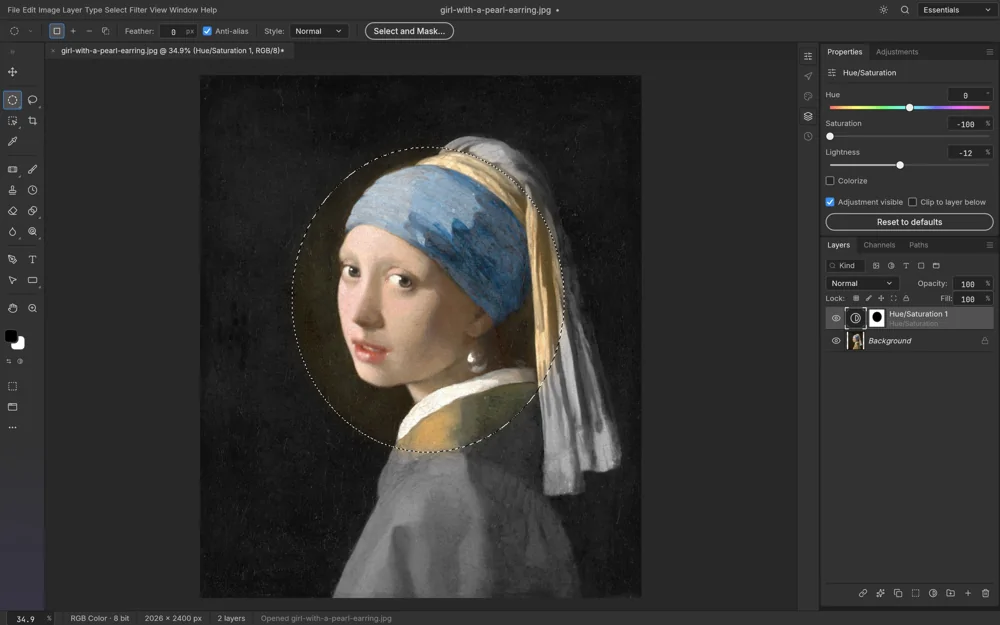
Adjustment layers retain parameters for operations such as Curves and Levels and affect content beneath them. Disable the layer to compare the result, or revise its settings without repeating a destructive pixel operation.
A direct pixel adjustment changes the selected layer’s pixel data. Either approach can be appropriate; the useful distinction is whether an operation changes parameters, visibility or the underlying pixels.
Pixel masks control visibility
In a typical mask, white reveals content, black hides it and gray makes it partly visible. A soft brush or gradient creates a gradual transition instead of deleting image pixels.
Masking an adjustment layer restricts color changes to a region. Before painting, confirm whether the mask thumbnail or the layer content is selected so that the brush affects the intended component.
Vector masks and clipping masks
A vector mask uses a path to define an edge and suits clean, deliberate outlines. A pixel mask suits soft gradients and detailed transitions. Choose according to the edge you need rather than treating the two as identical.
A clipping mask uses the transparency of a lower layer to constrain content above it. It can put a texture inside type or a shape and differs from painting an independent mask.
Practice a local color edit
Duplicate a practice image and add an adjustment layer that initially changes the whole image. Create or edit its mask to keep the effect in the desired region, then toggle visibility to compare before and after.
Save a working document that retains layers and masks, reopen it to check the result, and export the finished image. JPEG does not retain the editable mask structure and should not be your only working file.